SB9600 Daemon Configuration#
SB9600 is the internal radio control protocol used by many Motorola radios from the mid-80s through to the early 2000s.
Control Heads Supported#
The following radios can be controlled using the SB9600 control mode:
Astro Spectra radios/consolettes with W9 control heads (
controlHeadType: 0)XTL5000 radios/consolettes with W9 control heads (
controlHeadType: 0)MCS2000 radios with M3 control heads (
controlHeadType: 1)
A Radio Interface Box (RIB) is required to convert the differential SB9600 signal into standard serial. W3AXL created the MiniRIB USB as a compact, low cost device for interfacing SB9600 radios directly to USB ports, however any RIB can be used as long as it connects to a standard serial port.
Serial Port#
The serial port name used depends on the operating system the daemon is running in. For Windows systems, use the COMx format (i.e. COM1, COM2, etc). For Linux machines,
use the /dev/ttyX format (/dev/ttyS0, /dev/ttyUSB0, etc).
Softkey Bindings#
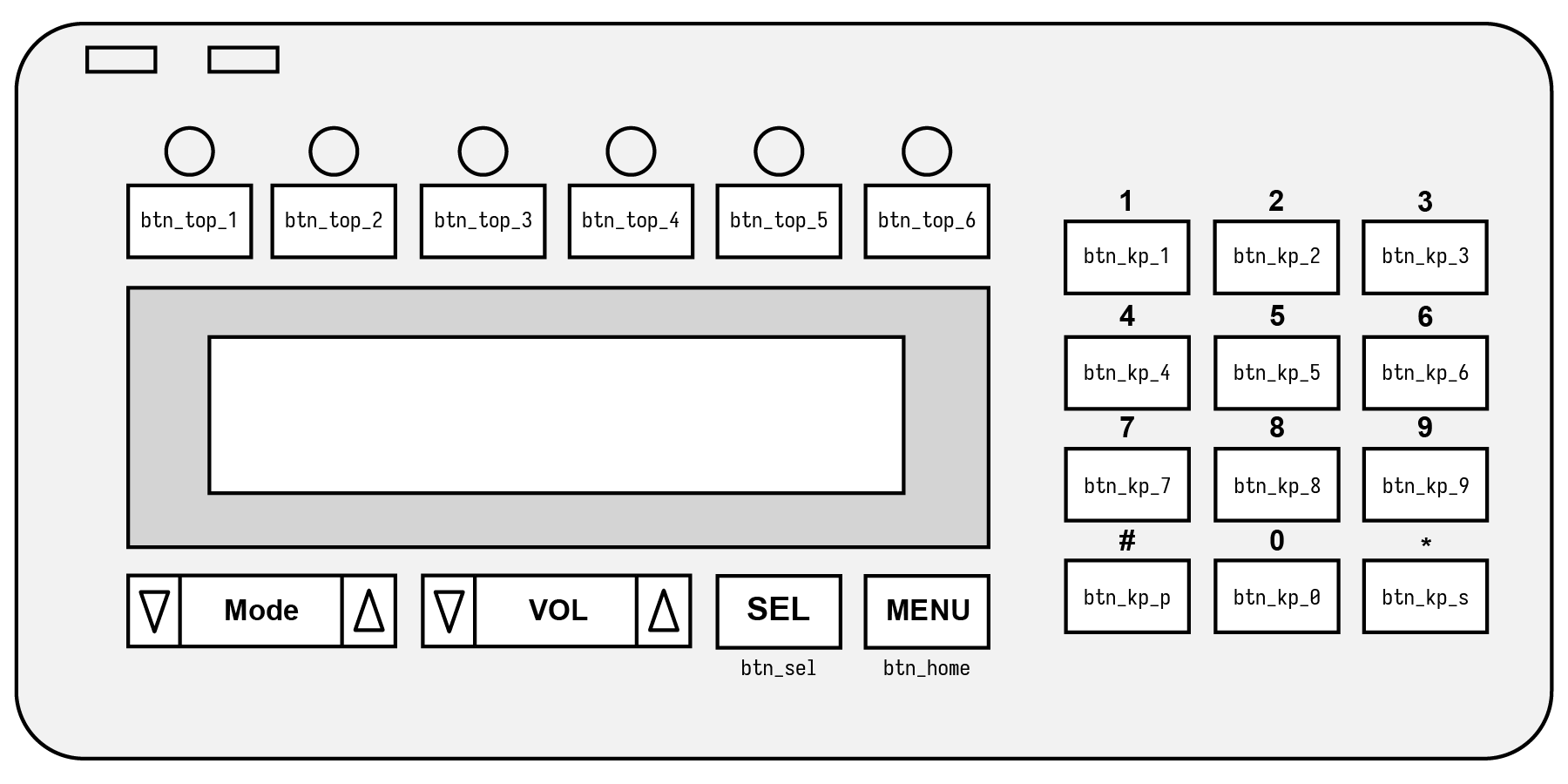
Once you’ve configured your softkey bindings as described in the previous section, you must bind them to physical radio buttons. This will depend on how you’ve programmed your radio button mappings in your codeplug. Reference control head images are below to cross-reference button names in RC2 with the buttons on each control head.
# Softkey button binding (maps SB9600 buttons to configured softkeys below)
softkeyBindings:
    # Each entry is in the format sb9600 button name: softkey name
    #   valid SB9600 buttons can be found in the configuration documentation
    btn_top_1: MON
    btn_top_2: LPWR
    btn_top_3: SCAN
    btn_top_4: DIR
    btn_top_5: SEC
    btn_top_6:
    btn_kp_1: CALL
    btn_kp_2: PAGE
    btn_kp_3: TGRP
    btn_kp_4:
    btn_kp_5:
    btn_kp_6:
    btn_kp_7:
    btn_kp_8:
    btn_kp_9:
    btn_kp_s: RCL
    btn_kp_0:
    btn_kp_p: DEL
    btn_home: HOME
    btn_sel: SEL
See the button names below for the appropriate control head:
W9 Head Button Naming#
M3 Head Button Naming#

Full Example Configuration#
# Radio control configuration
control:
    # Control Mode
    controlMode: 2 # SB9600

    # SB9600 configuration
    sb9600:
        # Serial port name (COMx on Windows, /dev/ttyX on linux)
        serialPort: "/dev/ttyS0"
        # Control head type
        #   0 - Astro W9 head (Astro spectra or XTL5000)
        #   1 - MCS2000 M3 Head
        controlHeadType: 0
        # Softkey button binding (maps SB9600 buttons to configured softkeys below)
        softkeyBindings:
            # Each entry is in the format sb9600 button name: softkey name
            #   valid SB9600 buttons can be found in the configuration documentation
            btn_top_1: MON
            btn_top_2: LPWR
            btn_top_3: SCAN
            btn_top_4: DIR
            btn_top_5: SEC
            btn_top_6:
            btn_kp_1: CALL
            btn_kp_2: PAGE
            btn_kp_3: TGRP
            btn_kp_4:
            btn_kp_5:
            btn_kp_6:
            btn_kp_7:
            btn_kp_8:
            btn_kp_9:
            btn_kp_s: RCL
            btn_kp_0:
            btn_kp_p: DEL
            btn_home: HOME
            btn_sel: SEL